Reduce your advertising budget

Identify and remove inefficient ad keywords that are costing too much.
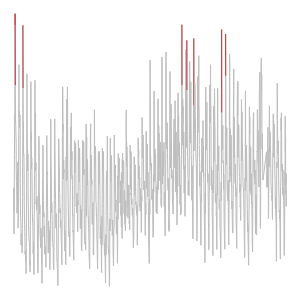
A graph of cost per click over time with outliers highlighted in red

Introduction

Unusually high cost per click can indicate low-quality keywords for online ads

Detect outliers to reduce customer churn, improve marketing strategies, and reduce ad spend


Add your user email and API key to your platform's secret manager.


import json
import requests
import os
import pandas as pd

api-key = os.environ['scimicro-api-key']
email = "user@scientificmicroservices.com"


install.packages(c('jsonlite', 'httr', 'data.table', 'ggplot2'))
library(jsonlite)
library(httr)
library(data.table)
library(ggplot2)

api-key <- Sys.getenv("scimicro-api-key")
email <- "user@scientificmicroservices.com"

The example data is 1,624 cost per click logs for online advertisements, sourced from the Numenta Anomaly Benchmark series.

The dataset includes several unusually high-cost keywords.


Download the dataset at "https://raw.githubusercontent.com/numenta/NAB/refs/heads/master/data/realAdExchange/exchange-2_cpc_results.csv"


url = 'https://raw.githubusercontent.com/numenta/NAB/refs/heads/master/data/realAdExchange/exchange-2_cpc_results.csv'
res = requests.get(url, allow_redirects=True)
with open('keywords.csv','wb') as file:
    file.write(res.content)
keywords = pd.read_csv('keywords.csv')
print(keywords)


mydata <- fread('https://raw.githubusercontent.com/numenta/NAB/refs/heads/master/data/realAdExchange/exchange-2_cpc_results.csv')
head(mydata)

Detect expensive keywords

Use SciMi DetectOutliers to monitor ad clickthrough rates and instantly find items with an unusually high cost-per-click.

DetectOutliers sends a signal each time an anomaly is detected.


Use the DetectOutliers endpoint at api.scientificmicroservices.com to analyse the ppc column of the dataset we downloaded. Give the user email and key in the header with the titles 'email' and 'key'.


url = "https://api.scientificmicroservices.com/detectoutliers"

headers = {
    'email': YOUR_EMAIL,
    'key': YOUR_KEY,
    'Content-Type': 'application/json'
}

data = keywords['ppc']
response = requests.post(url_outliers, headers=headers, json=data)
outliers = response.json()
print(outliers)


url <- "https://api.scientificmicroservices.com/detectoutliers"

response <- POST(
  url = url, 
  add_headers(  'email'= email,
                'key' = api-key,
                'Content-Type' = 'application/json'
  ),
  body = toJSON(mydata$ppc),
  encode = "json"
)

outliers <- fromJSON(content(response, as = 'text'))
outliers[, position := position+1] # Indexing is 0 based, so R requrires adjustment 
print(outliers)

Take action

DetectOutliers found 8 keywords with an unusually high cost per click.

Recommended action: Evaluate the quality of these keywords and consider replacing them.

A graph of cost per click over time with outliers highlighted in red

Summary

DetectOutliers found a unique set of unusally expensive keywods in an online ad campaign.

Removing or replacing these keywords will reduce your overall ad budget, improving your return on investment.